How to take Screenshots if Test Case fails?


One basic question which comes in everyone's mind is : What happens if test case fails? Where was the error in script and How can we capture it?

So, the solutions is always (at least in most of the cases) to take screenshots of webpage when the test run fails.

With one look at the screenshot we can get an idea of where exactly the script got failed. Moreover reading screenshot is easier compare to reading 100's of console errors

To get screenshot on test failure, we should put the entire code in try-catch block. In the catch block we should paste the screenshot code:

public class TakeScreenshot {
 
   WebDriver driver;
 
 @BeforeTest
 public void start(){
  driver = new FirefoxDriver();
 }


Run a Bat File with Java Program


Sample JAVA Code:

public class RunBat {

public static void main(String[] args) throws IOException, InterruptedException{

Runtime runtime = Runtime.getRuntime();
Process process = runtime.exec("cmd /c F:\\bb.bat");
process.waitFor();
}
}

How to handle Authentication PopUp using Selenium?

Sometime we have to automate websites which shows authentication Pop Up like mentioned below:


In order to automate this PopUp, we will pass UserId and Password via URL:

http://username:password@anytestwebsite.com

Java Script:

String URL = "http://" + username + ":" + password + "@" + anytestwebsite.com;
driver.get(URL);
Alert alert = driver.switchTo().alert();
alert.accept();

Database Connection in Selenium


  • Below is the source code to connect your MySQL database with Selenium :
Class.forName("com.mysql.jdbc.Driver");
Connection con = (Connection) DriverManager.getConnection ("jdbc:mysql://localhost:3306/demo","username","password");
Statement stmt = (Statement) con.createStatement();
// Below statement we use for executing sql queries.
stmt.executeQuery("Select * from dbtable");

In order to connect, you will need to add one jar file which you can download by clicking here

  • To connect Oracle database with Selenium, write below code:
Class.forName("oracle.jdbc.driver.OracleDriver");
Connection con =
DriverManager.getConnection("jdbc:oracle:thin:@localhost: 
1521:orcl","username","password");
Statement stmt = con.createStatement();
stmt.executeQuery("Select * from dbtable");

In order to connect, you will need to add one jar file which you can download by clicking here

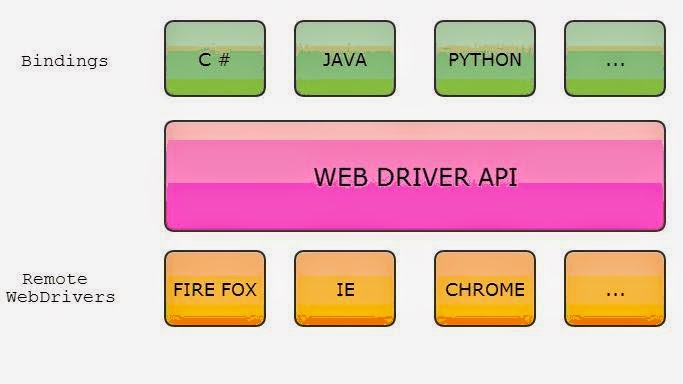
Selenium Webdriver Architecture


This diagram is just to show how Selenium Webdriver works. If anyone asks for Selenium Webdriver architecture then just need to design the below diagram and explain it. I share this as it is one of the most frequently asked Selenium Question

Selenium Architecture
Selenium Webdriver Architecture

Selenium Remote Control Architecture


This diagram is just to show how Selenium Remote Control works. If anyone asks for Selenium RC architecture then just need to design the below diagram and explain it. I share this as it is one of the most frequently asked Selenium Question


Selenium RC Architecture
Selenium Remote Control Architecture

Alert handling in Selenium


public static void main(String[] args) throws InterruptedException {
WebDriver driver = new FirefoxDriver();
String Url = "http://sislands.com/coin70/week1/dialogbox.htm";
driver.get(Url);
WebElement alert = driver.findElement(By.xpath("///div[1]/center/table/tbody/tr/td/form[1]/p/input"));
alert.click();
Alert popup = driver.switchTo().alert();
System.out.println(popup.getText());
popup.accept();
Thread.sleep(3000);
driver.close();

}

Pick Date From a Calendar in Selenium


public static void main(String[] args) throws InterruptedException {

WebDriver driver = new FirefoxDriver();
driver.get("http://jqueryui.com/datepicker/");
driver.manage().window().maximize();
driver.switchTo().frame(0);
driver.manage().timeouts().implicitlyWait(3000, TimeUnit.MILLISECONDS);
driver.findElement(By.xpath("//*[@id='datepicker']")).click();
driver.manage().timeouts().implicitlyWait(3000, TimeUnit.MILLISECONDS);
driver.findElement(By.xpath("//*[@id='ui-datepicker-div']/div/a[2]/span")).click();
List column = driver.findElements(By.tagName("td"));
for (WebElement j : column)
{
if (j.getText().contains("13")){
j.findElement(By.linkText("13")).click();
break;
}
}
Thread.sleep(5000);
}

How to write dynamic Xpath to identify elements on Webpage?


We always have concerns about writing Dynamic Xpath. So, I've listed below some ways to write xpath with example. If you face any problem, Contact Us:

1) Based on location
2) Using Single Attributes
3) Using Multiple Attributes
4) Using functions


All examples are based on following HTML Code:

input class="search-field" name="s" placeholder="Search …" title="Search for:" type="search" value=""

Run your script in Internet Explorer (IE)


 public static void main(String[] args) throws InterruptedException { DesiredCapabilities ieCapabilities = DesiredCapabilities.internetExplorer(); ieCapabilities.setCapability(InternetExplorerDriver.INTRODUCE_FLAKINESS_BY_IGNORING_SECURITY_DOMAINS,true); System.setProperty("webdriver.ie.driver", "C:/IEDriverServer.exe"); WebDriver driver = new InternetExplorerDriver(ieCapabilities); driver.get("http://google.com"); Thread.sleep(5000); driver.quit(); }

- Download IE Driver by Clicking Here

How to handle Cookies using Selenium Webdriver?


  • Sometimes, we face issues because of cookies session created by Selenium scripts and we have to delete them using Selenium Webdriver. So, here is the code:

public class Cookies
{
    public static void main(String[] args) 
    {
        WebDriver driver=new FirefoxDriver();
        driver.get("http://in.quikr.com/");
        
        Set cookies=driver.manage().getCookies();
        
        //To fetch out the number of cookies used by this site
        System.out.println("Number of cookies in this site "+cookies.size());
        
     //Using advanced For Loop
        for(Cookie cookie:cookies)
        {
            System.out.println(cookie.getName()+" "+cookie.getValue());
            
            //This will delete cookie By Name
            driver.manage().deleteCookieNamed(cookie.getName());
            
             }
         //This will delete all cookies.
        driver.manage().deleteAllCookies();
           } }

For any query, ContactUs

Mouse Hover in selenium


public static void main(String[] args) throws InterruptedException {

WebDriver driver = new FirefoxDriver();
driver.get("http://www.timeanddate.com/");
driver.manage().window().maximize();
WebElement menu = driver.findElement(By.xpath("//*[@id='nav']/ul/li[3]/a"));
Actions action = new Actions(driver);
action.moveToElement(menu).perform();
WebElement submenu = driver.findElement(By.xpath("//*[@id='nav']/ul/li[3]/ul/li[4]/a"));
action.moveToElement(submenu).click().perform();

Thread.sleep(5000);
driver.close();
}

For any queries, ContactUs

Get all links of a Webpage using Selenium


How to test links of any website?

public static void main(String[] args) {
WebDriver driver = new FirefoxDriver();
driver.get("https://www.google.co.in/");
List links = driver.findElements(By.tagName("a"));
System.out.println(links.size());    // to check the number of links present at webpage
for (int i = 1; i {
System.out.println(links.get(i).getText());
}
}

How to handle iFrames in Selenium?


A basic example of handling frames at www.espncricinfo.com

import java.util.concurrent.TimeUnit;
import org.openqa.selenium.By;
import org.openqa.selenium.WebDriver;
import org.openqa.selenium.firefox.FirefoxDriver;

public class Abc
{
public static void main(String args[])
{
WebDriver driver=new FirefoxDriver();
driver.get("http://www.cricinfo.com/");
driver.manage().timeouts().implicitlyWait(3000, TimeUnit.MILLISECONDS);
driver.findElement(By.linkText("Countries")).click();
driver.switchTo().frame(driver.findElement(By.xpath("//*[@id='ciHomeContentrhs']/iframe")));
driver.findElement(By.linkText("Cricinfo")).click();
}
}

How to handle multiple windows in Selenium?


Example of handling Multiple Windows in Selenium:

public static void main(String[] args) throws InterruptedException {
// TODO Auto-generated method stub
WebDriver driver = new FirefoxDriver();
driver.get("https://www.abc.com/");
driver.manage().window().maximize();
String Window1 = driver.getWindowHandle();
driver.findElement(By.linkText("Contact us Now")).click();
for (String Window2 : driver.getWindowHandles())
{
driver.switchTo().window(Window2);
}
driver.findElement(By.xpath("//*[@id='bigin']")).sendKeys("abcde");
Thread.sleep(5000);
driver.close();
driver.switchTo().window(Window1);
driver.getTitle();
Thread.sleep(3000);
driver.close();
}

For more info, Contact Us

How to handle Select in Selenium


Example of using Select in Selenium 

public static void main(String[] args) throws InterruptedException {
WebDriver driver = new FirefoxDriver();
driver.get("https://www.mobikwik.com/");
driver.manage().window().maximize();
driver.findElement(By.xpath("//*[@id='mobile_number']")).sendKeys("9910979218");
driver.findElement(By.xpath("//*[@id='mobile_amount']")).sendKeys("10");
WebElement operator = driver.findElement(By.xpath("//*[@id='mobile_operator']"));
Select option = new Select(operator);
option.selectByVisibleText("Idea");
Thread.sleep(5000);
driver.close();
}

How to register in Facebook?


Below is the code to make an account on Facebook using Selenium Wedriver:

public class FacebookRegistration {

public static void main(String[]args)
{
WebDriver driver = new FirefoxDriver();
driver.get("https://www.facebook.com/");
driver.manage().window().maximize();
driver.findElement(By.xpath("//*[@value='First Name']")).sendKeys("raj");
driver.findElement(By.xpath("//*[@value='Last Name']")).sendKeys("raja");
driver.findElement(By.xpath("//*[@value='Your email address']")).sendKeys("raja@mail.com");
driver.findElement(By.xpath("//*[@value='Re-enter email address']")).sendKeys("raja@mail.com");
driver.findElement(By.xpath("//*[@value='New Password']")).sendKeys("A123a!");
new Select(driver.findElement(By.xpath("//*[@name='birthday_day']"))).selectByValue("1");
new Select(driver.findElement(By.xpath("//*[@id='month']"))).selectByValue("2");
new Select(driver.findElement(By.xpath("//*[@id='year']"))).selectByValue("1987");
driver.findElement(By.xpath("//*[@id='u_0_g']/span[1]/label")).click();
driver.findElement(By.xpath("//*[@id='u_0_i']")).click();
}
}